

Software for service contractors.
Handle today. Be ready for Temaro .
You're out doing the work. Temaro keeps customer details, quotes, schedules, crew and invoices together, so you can see what needs you next.
Keep your business number. No contract. Cancel anytime.
- Coatings
- Landscaping
- Excavation
- Pressure washing
- Junk removal
- and other service trades
On your own or with a crew.
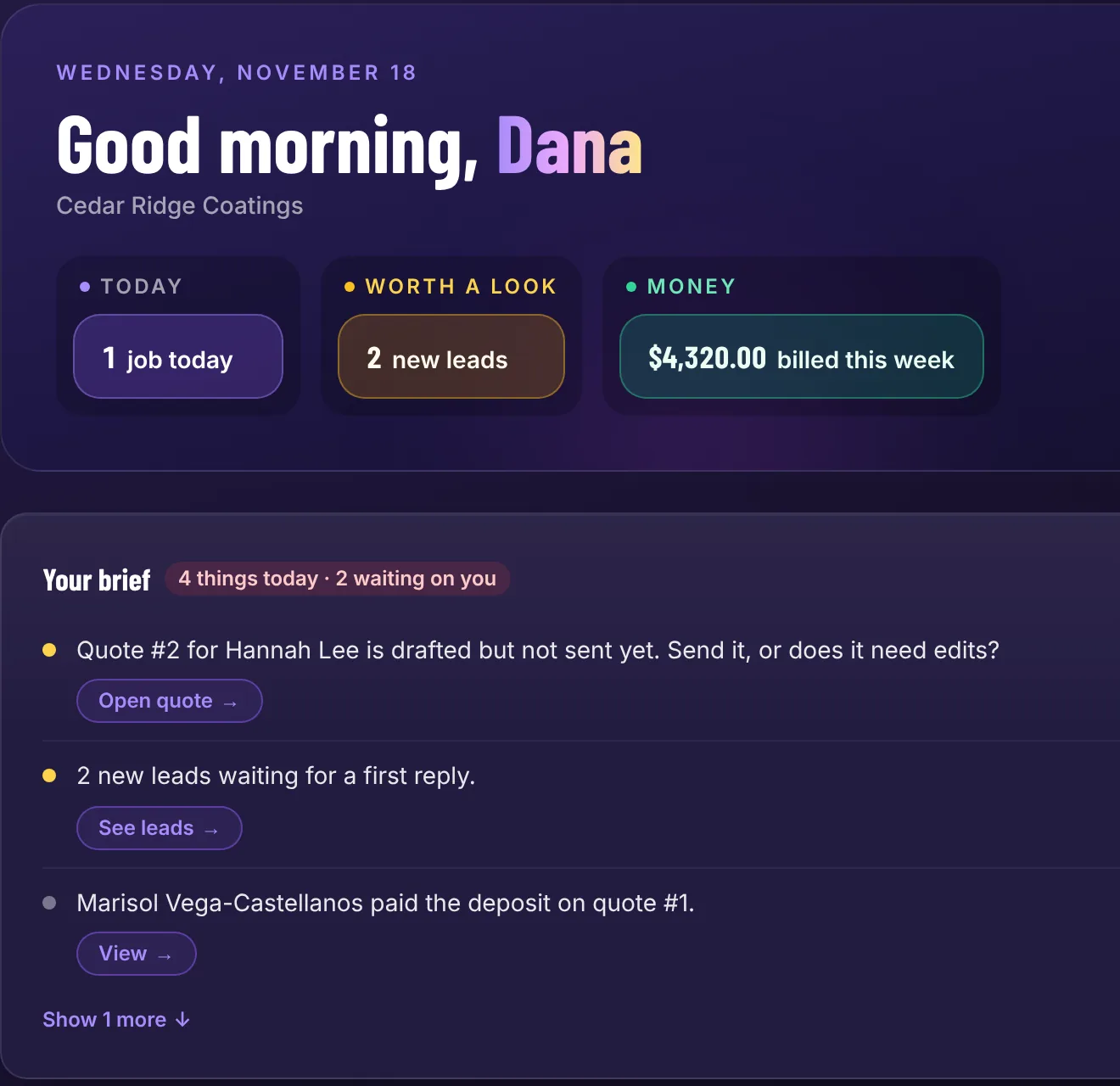
Your office view
Like having help back at the office.
A customer needs a quote. A job needs a date. Someone's waiting on a reply. Keep the details together and see what needs you next.
How it works
One job, from request to finished.
Illustrative job · sample data
Stage 1 of 5: Request
Start with the details. Not a scrap of paper.
Marisol wants a quote on her two-car garage floor. Her request arrives with what she needs, her photos and how to reach her, in one place.
Meet your next customer anywhere. Share your business card by link or QR code so they can save your details and request a quote. It can link to your website, Facebook and Instagram too.
Next step: Review the details and prepare a quote.
Example · sample data
- RequestGarage floor, about 800 sq ft. Grind off the old paint, flake epoxy.
- PhotosSent with the request
- ContactPhone and email on her record
For you and your crew
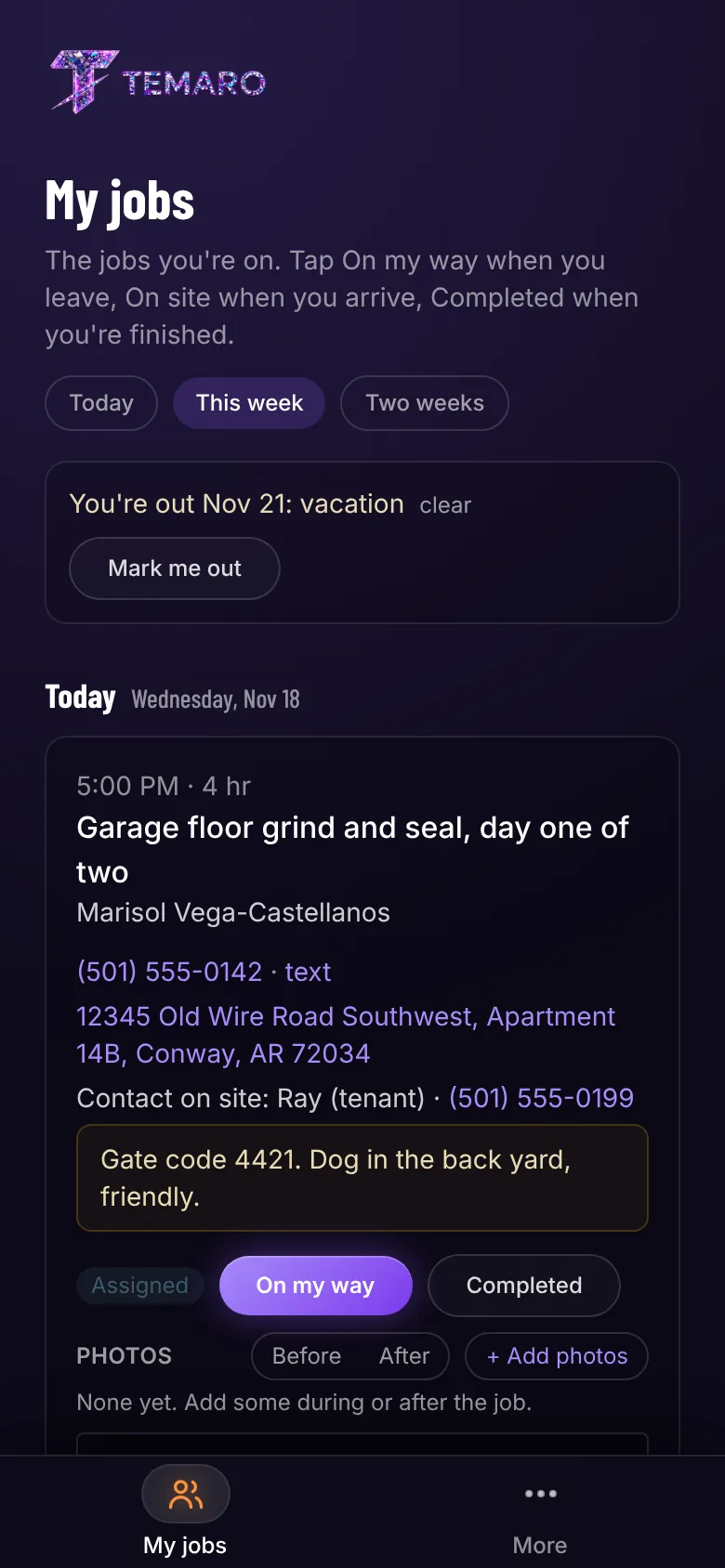
Keep your crew on the same page.
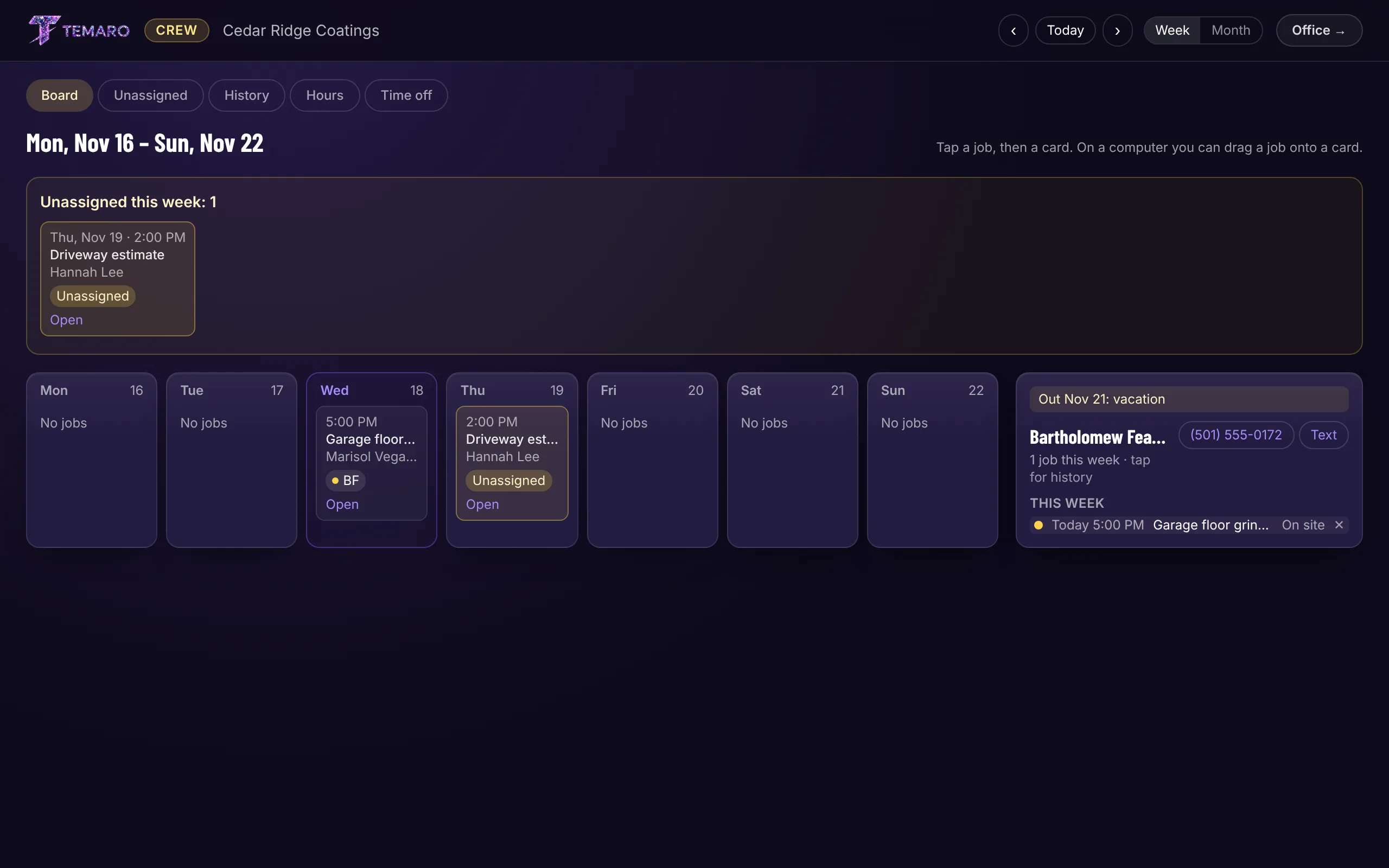
Assign the job, share the details, and follow progress from On my way to Completed. Your crew has what they need on their phone, and you can see how the work is moving.
- Assign jobs and see who's doing what.
- Keep the address, job instructions and photos together.
- Get updates as your crew marks On my way, On site and Completed.
Each teammate has their own login. You control Office and pricing access.
Crew workspace included on every plan.
See seats on each planYour crew's view
Your view
Meet Tempe
A helping hand. You're still the boss.
Give Tempe your playbook: the work you do, where you go, your pricing and your rules. Choose how much help you want with each supported activity.
In your playbook, for example
- Service area
- Price list
- Deposit rules
- Availability
Tempe drafts quotes from your price list, Temaro checks its replies for unexpected dollar amounts, and it never texts anyone who said STOP.
See AI Pro pricingExample: help with a quote draft
Tempe prepares it and texts you for a yes, then it goes.
Illustration only. These buttons don't change your account. Tempe is on AI Pro; available actions depend on the activity and your settings.
What Temaro keeps together
Prepare. Organize. Follow through.
- Prepare
- Customer details, requests and quotes in one place, ready when you are.
- Organize
- Your schedule and every job's details, and the Work tab showing each job's stage and what it's waiting on.
- Follow through
- Invoice and payment status at a glance, review requests after the job, and follow-ups where your plan and the customer's own permission allow.
Working for companies too?
Keep a company's contacts, locations, P.O. details and notes together on one company card.
Before you sign up
Getting started
1. Start organizing your work
Customers, quotes, invoices and scheduling are the core of Temaro on every plan. Share quotes and invoices by email or a link while you set up texting.
2. Take online payments
Connect Stripe and finish its checks before customers can pay online. Payouts follow Stripe's schedule.
3. Add texting and missed-call help
Texting needs the phone carriers' approval. Missed-call texts also need your phone to forward the calls you don't answer: a call that never forwards can't reach Temaro.
Start with customers, quotes and scheduling. Add Tempe by choosing AI Pro. Everyday quoting, invoicing and scheduling don't need AI Pro.
Questions before you start? Contact Temaro. Or email support@temaro.io.
Plans
Pick the plan that fits how you work.
Billed monthly. A seat is a teammate's own login; yours doesn't use one.
For working on your own, or with one helper.
Starter
$49/mo
- PeopleYou, plus 1 teammate login
- Texts300 texts a month
- Crew and measuringCrew workspace, a square-footage calculator and a measuring link for customers
- TempeTempe not included
Everything in Starter
- Missed-call auto-text with an intake link
- Text customers back right from Temaro
- Quotes with deposits, sent by text or email
- Your prices for your trade, so requests from your form arrive already priced
- Invoices with a Pay button, or take payment on the spot with a QR code
- Repeating jobs every week, 2 weeks or month, each visit with its own invoice
- An online booking page where customers pick an open time
- Crew workspace: drag jobs onto your crew, they get the card by text and tap On my way / On site / Completed
- Crew history, hours, time off and job photos; office access per seat
- Automatic review requests, and optional win-back check-ins (off until you turn them on) for customers who said yes to offers
- Schedule, Stats, and a calendar feed for your phone
- Square-footage calculator in the quote, and a measuring link for customers
- 300 texts a month included
For a small team.
Standard
$99/mo
- PeopleYou, plus 5 teammate logins
- Texts600 texts a month
- Crew and measuringCrew workspace, and measuring from the satellite map
- TempeTempe not included
Everything in Standard
- Everything in Starter
- 5 seats with their own logins
- Measure yards and driveways from the satellite map, straight into the quote
- 600 texts a month included
For contractors who want Tempe's help.
AI Pro
$140/mo
- PeopleYou, plus 8 teammate logins
- Texts1,500 texts and 150 picture messages a month
- Crew and measuringCrew workspace, and measuring from the satellite map
- TempeTempe included: 500 AI actions a month
Everything in AI Pro
- Everything in Standard
- 8 seats with their own logins
- Tempe answers customers' texts at the level you pick: Suggest only, Ask me first, or Just do it
- Quotes drafted from your price list; approve by replying SEND
- Times offered that fit your route; follow-ups on quotes, and invoice reminders on day 7 and 14
- Voicemails read into leads; your work photos sent on request
- A morning brief of what needs you; Tempe in chat for anything else
- 1,500 texts and 150 picture messages a month included
- 500 AI actions a month, and up to 200 of them can be Tempe texting your customers back
Choose a monthly plan during signup. A valid trial code follows its own terms.
No contract. Cancel anytime.
A text is one message you send, however long it is. Texts customers send you don't count. A picture message counts as one text, and AI Pro includes 150 of them a month.
Missed-call texts, quotes and invoices always go out, even past the monthly amount. Go over, and the automatic extras (follow-ups, review requests, Tempe's replies) pause until next month. You'll see it coming at 80%, and you can buy a pack or move up a plan any time.
Packs: 500 more texts for $15, on any plan. On AI Pro, 250 more AI actions for $20, and up to 100 of them can be Tempe replies. A pack lasts a year. You're never billed per text. A pack is only ever something you choose to buy.
An AI action is one thing Tempe does for you: a reply drafted, a quote drafted, or a question answered in chat.
Measurements for a first estimate without the trip: a calculator in the quote, a link the customer can measure from, and on Standard and AI Pro the satellite map, and you confirm on site before the final price.
Questions
Frequently asked questions
What happens when I sign up?
Some of Temaro works the moment you sign up, and three things take a step from you first:
- Right away: your customer list, quotes and invoices by email or a link, scheduling, your crew and your request form. If you want calling and texting, your Temaro number is set up when your plan starts.
- Payments: connect Stripe in Settings → Online payments, and customers can pay deposits and invoices online from then on.
- Texting your customers: the phone carriers require a texting registration for every business. Temaro fills in most of it from your signup and pays the fees; approval usually takes under a week, sometimes up to three. Until then, send quotes and invoices by email or a link.
- Missed-call texts: forward calls you don't answer to your Temaro number. How depends on your phone company: usually a short dial code, sometimes a call to them. Settings shows how and runs a test call to check it worked. On an iPhone, don't use the Call Forwarding switch in Settings: it forwards every call, so your phone would never ring.
Do I need a new phone number?
No. Customers keep calling the number they already have. Here's which number does what:
- Calls ring your own phone first, the same as today.
- Missed calls go to a local number Temaro sets up for your business when your plan starts. You set your phone to forward only the calls you don't answer to it (how depends on your phone company; Settings walks you through it and a test call checks it). Once your texting registration is approved, Temaro texts the caller back. It takes a voicemail too, if you switch voicemail on.
- Texts go out from that Temaro number once your texting registration is approved: the missed-call reply, quotes, invoices, review requests and Tempe's replies. Each one names your business, and customers can reply to it.
Someone who calls the Temaro number directly is handled like a missed call: a short message (or the voicemail prompt, if voicemail is on), then the same text-back. Nobody answers it live.
How soon can I start texting customers?
I don't have a business tax ID (EIN). Can I still text customers?
What happens when I miss a call?
Can Temaro text my past customers to bring them back?
Can my team use it too?
Is my customers' information safe?
What does Tempe never do?
What happens if I use up the month's texts?
What does it cost when a customer pays online?
Customers can pay deposits and invoices by card or by bank account through Stripe, and the money goes to your own Stripe account. Two fees come out of each payment. On a $2,880 job:
- By card: Stripe $83.82 (2.9% + 30¢) + Temaro $8.64 (0.3%) = $92.46
- By bank: Stripe $5.00 (0.8%, never more than $5) + Temaro $8.64 (0.3%) = $13.64
Stripe pays the money out to your bank on your payout schedule, and your very first payout typically takes 7 to 14 days (your bank may take a little longer to show it). A bank payment takes about 4 business days to clear before it's paid out.
If a customer disputes a payment or a bank payment fails, Stripe's fees for that are yours, at exactly what Stripe charges with nothing added: $15 when a customer disputes a payment, another $15 only if evidence is sent to contest a card dispute and it isn't won (Stripe gives that one back on a win), and $4 when a bank payment fails. If you refund a customer, they get back the full amount you choose; the fees taken from that payment aren't returned and Temaro adds no refund fee. If the refund is down to a mistake on Temaro's side, Temaro covers them. No monthly minimum, no fee on payments you take any other way.
Can I cancel anytime?
Yes. It's billed monthly, with no contract. There are two ways to stop:
- Cancel your plan (Settings → Billing → Manage billing). Billing stops and your account and data stay. Your Temaro number stops sending and is kept for 30 days. Come back within that time and it's yours again; after that it's released, and the phone company may give it to someone else.
- Delete your account (Settings → Delete account). Everything stops that day, including your subscription. Your data is held for 30 days in case you change your mind, then permanently deleted, apart from the payment records the Privacy Policy lists.
Either way, you can download your customers, quotes and invoices as spreadsheets first.